
Best Gemini Omni Alternatives: Veo Replacement Guide for 2026
Looking for a Gemini Omni or Veo replacement? Compare options for text-to-video, image-to-video, editing, API readiness, and production workflows.
Emma Chen · 14 min read · May 20, 2026
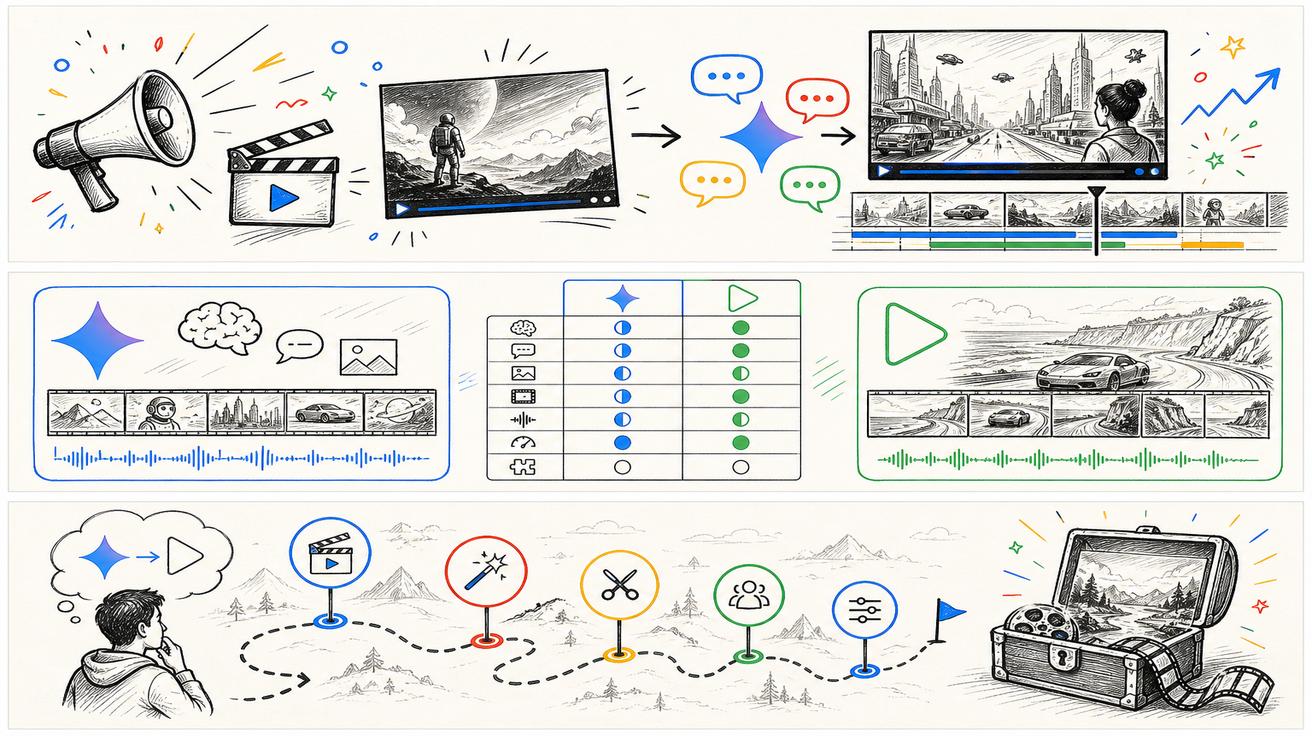
Google's Gemini Omni launch immediately created a new question: if Omni is replacing Veo in the Gemini app, what should creators, marketers and developers use next? The answer depends on what you mean by "replacement." Some people need a consumer app for quick video generation. Some need a conversational editor. Some need an API for production automation. Some only need a temporary fallback while Google clarifies Gemini Omni's developer rollout.
This guide gives a practical framework for choosing a Gemini Omni alternative or Veo replacement in 2026. It is deliberately conservative about the news. Google says Gemini Omni will replace Veo in the Gemini app. Google's Blog says Omni Flash is rolling out to Gemini app, Google Flow and YouTube Shorts, with developer and enterprise APIs coming in the coming weeks. DeepMind still hosts a Veo 3.1 page. So the goal is not to panic-replace every Veo workflow. The goal is to map each job to the safest tool path.
Official sources checked for this update:
- Google Gemini video generation page, which says Gemini Omni will replace Veo in the Gemini app.
- Google Blog: Introducing Gemini Omni, which says Gemini Omni Flash is rolling out to the Gemini app, Google Flow and YouTube Shorts, with developer and enterprise API rollout planned in the coming weeks.
- Google Blog: Next evolution of the Gemini app, which describes Gemini Omni as a model for transforming text, images and video prompts into cinematic video outputs.
- Google DeepMind: Gemini Omni, which describes Omni's world understanding, multimodality, editing features, SynthID watermarking and C2PA credentials.
- Google DeepMind: Veo 3.1, which remains live and documents Veo 3.1 capabilities. This is why this article does not claim that Veo is globally discontinued.
First, define what you are replacing
Before comparing tools, define your actual dependency. "Veo replacement" is too broad. Are you replacing a Gemini app feature, a Google Flow workflow, a Veo 3.1 learning path, a free AI video generator, a paid API, or a team production process?
If you use the Gemini app, Gemini Omni is not an alternative; it is likely the new default direction. Your next step is to test Omni, learn the interface and understand its limits. If you use Veo through a developer or enterprise path, your next step is to wait for official Gemini Omni API documentation and keep your current workflow stable until there is a migration path.
If you use Veo as a benchmark for quality, then alternatives should be judged by output quality, prompt adherence, motion consistency, audio, editing control and reliability. If you use Veo as a keyword category, alternatives should be organized by search intent: text-to-video, image-to-video, free tools, no-watermark tools, product videos and API automation.
Replacement categories
1. Gemini Omni itself for Gemini app users
For Gemini app users, the first replacement path is simply Omni. Google's official page frames Omni as the new video generation and editing model for the app. It emphasizes natural-language editing, image-to-video, video-based AI editing, avatars and multimodal creation.
This is the best path if you want a Google-native consumer workflow and already have the required Google AI plan in a supported region. It may also be the best path if you care about SynthID and Google's content verification ecosystem. The limitation is that consumer access, plan limits and rollout availability can differ by country and subscription tier.
2. Google Flow for creative studio workflows
Google's Omni announcement says Omni Flash is also rolling out to Google Flow. Flow is more relevant for creators who think in scenes, clips and story workflows rather than one-off app generations. If your Veo workflow already involved Flow, do not assume the same feature surface appears in the Gemini app or vice versa. Check Flow-specific availability and limits.
Flow may be the safest Google-native choice for filmmakers, agencies and creative teams that want a studio-like environment. It is not necessarily the same as a lightweight consumer editing task. Treat Gemini app, Flow, Shorts and future APIs as separate surfaces until Google documents a unified workflow.
3. Existing Veo 3.1 documentation and workflows
A surprising but important alternative is to keep using the existing Veo path if it still works for your use case. DeepMind's Veo 3.1 page remains live. If your team has documentation, prompts, examples, billing expectations and review processes around Veo, do not rip them out just because a Gemini app page changed language.
The right move is to add an update note to internal docs: Google says Omni replaces Veo in the Gemini app; check whether our product surface is affected. That protects teams from overreacting while still acknowledging the news.
4. Text-to-video tools for broad creative generation
If your core job is creating videos from prompts, compare text-to-video tools based on quality, prompt adherence, motion, realism, speed, cost and export limits. Some teams need cinematic realism. Others need fast social clips. Others need a no-code tool that a marketing intern can use without touching an API.
For a broader tool list, start with our text-to-video AI tools and best free AI video generators pages. The key is to test the same prompt across tools and score output consistency, not just the best cherry-picked sample.
5. Image-to-video tools for product and social workflows
Many users do not need a pure text-to-video model. They have product photos, app screenshots, portraits or lifestyle images and need short motion clips. In that case, the best Gemini Omni alternative may be an image-to-video workflow rather than another text generator.
Compare whether the tool preserves product shape, brand colors, faces, hands and text. Check whether it introduces unwanted artifacts or changes packaging details. For ecommerce, app previews and ads, a slightly less cinematic but more consistent image-to-video workflow can outperform a more powerful general model.
See our image-to-video free tools guide for options and evaluation criteria.
6. API-ready video generation for developers
Developers should prioritize API stability, model IDs, rate limits, latency, error handling, content policy clarity, pricing and legal review. Google says Omni APIs are coming in the coming weeks, but until those docs are live, it is risky to promise production support.
If your product needs video generation now, compare existing API-ready options and keep the integration layer abstract. Build your pipeline so model providers can be swapped without rewriting your entire product. Store prompt templates, model parameters, safety decisions and output metadata separately. That way, if Gemini Omni becomes available through an API, you can test it without disrupting customers.
7. Editing-first tools for existing footage
Gemini Omni is strongly positioned around editing existing videos through conversation. If that is the job you care about, compare alternatives by editing quality rather than raw generation. Can the tool keep a character consistent? Can it change a background without breaking lighting? Can it apply a motion style from one video to another? Can it make multi-turn changes without drifting?
A tool that is excellent at first-generation clips may be weaker at editing footage. This is why "best alternative" cannot be one universal ranking. The best alternative depends on whether your input is a prompt, an image, a finished video, an audio track or a storyboard.
Evaluation checklist
Use this checklist before moving a workflow away from Veo or into Gemini Omni:
- Access: Is the tool available in your country, account type and subscription tier?
- Input support: Does it support text, images, video and audio references you actually use?
- Output quality: Does it preserve motion, physics, faces, products and on-screen text?
- Editing control: Can you refine a clip without starting over?
- Audio: Does it generate or preserve dialogue, ambient sound and music in the way you need?
- API readiness: Is there official developer documentation, pricing and rate limits?
- Watermarking and transparency: Does the tool add SynthID, C2PA, visible watermarks or platform labels?
- Commercial rights: Are your use cases allowed under the plan terms?
- Review workflow: Can a team approve, version and archive outputs?
- Cost: Does the price make sense for your output volume and retry rate?
Recommendations by use case
For Gemini app creators, test Omni first. It is the official direction for the Gemini app, and the editing-first workflow may be better than the old mental model of Veo prompts.
For marketers, keep your existing Veo-related pages and workflows, but add an update note. Then test Omni against your most common assets: product photos, testimonials, app screenshots, webinar clips and ad hooks.
For developers, do not migrate until Google publishes API details. Prepare an abstraction layer now so you can test Omni quickly later.
For SEO teams, publish a small, accurate cluster: a news explainer, a comparison article and an alternatives guide. Do not mass-change old Veo titles or delete pages. Search demand will split between Veo and Omni for a while.
For teams looking for alternatives today, compare by workflow. Use Veo 3 pricing, Google Veo free access, best free AI video generators, image-to-video tools and text-to-video tools as starting points.
What not to do
Do not delete old Veo pages just because Omni launched. Users still search for Veo, Google still hosts Veo documentation and many workflows may remain relevant.
Do not write that Veo is dead everywhere. The official language is narrower and tied to the Gemini app. Overstating the story may get clicks for a day but will damage trust and create correction work later.
Do not assume Omni API access is ready for your product until official developer docs say so. A consumer app rollout and an enterprise API rollout are different things.
Do not choose an alternative from demo videos alone. Test repeatability, failure cases, text rendering, face consistency, product fidelity and review controls.
Bottom line
The best Gemini Omni alternative is not one tool. It is the tool that fits the surface you are replacing. Gemini app users should test Omni. Flow users should check Flow availability. Developers should wait for API documentation while preparing a flexible integration layer. Marketers and creators should compare real workflows, not just launch headlines. And SEO teams should cover the transition accurately: Gemini Omni replaces Veo in the Gemini app, while broader Veo availability and APIs need separate official confirmation.
Example replacement paths
Scenario A: social creator. You make short clips for TikTok, Shorts or Reels. Your priorities are speed, style templates, easy editing and affordable retries. Gemini Omni in the Gemini app may be a strong first test because Google is emphasizing conversational editing and app-native creation. If access is limited, compare free or low-cost AI video generators and prioritize tools that export quickly and preserve visual style.
Scenario B: ecommerce team. You need product videos from photos. Your top priority is product fidelity. A tool that creates cinematic motion but changes the product shape is not acceptable. In this case, evaluate image-to-video tools, not just text-to-video tools. Test with packaging, logos, hands, reflective objects and screenshots. Keep a human review step before publishing ads.
Scenario C: SaaS or app marketer. You need app preview videos, UI walkthroughs and launch clips. The best replacement may be a controlled workflow that uses screenshots, screen recordings and scripted camera movement. Gemini Omni's editing features may help, but you should compare whether it preserves UI text and does not invent product features.
Scenario D: developer platform. You need a video generation API inside your own product. Do not treat Gemini app availability as API availability. Build a provider abstraction, keep logs of prompt and output metadata, and wait for official Gemini Omni API documentation. If you need a provider today, choose one with published endpoints, rate limits and pricing.
Scenario E: SEO publisher. You need to cover the news without damaging existing rankings. Publish a Gemini Omni cluster, add cautious update notes to Veo pages, and avoid redirects or title rewrites until you have GSC data. The audience is confused; the job is to explain, not to sensationalize.
Comparison worksheet
Create a spreadsheet with one row per tool and the following columns: access tier, countries supported, prompt-to-video quality, image-to-video quality, editing existing video, audio support, API status, team collaboration, watermarking, rights, price per usable clip, average retries, and export resolution. Then add three test prompts: a product ad, a human testimonial scene and a UI walkthrough. Score each output from one to five and record notes about failure modes.
This worksheet is more useful than a generic ranking because video tools fail differently. Some create beautiful landscapes but struggle with hands. Some preserve product photos but have weak camera movement. Some have generous free trials but visible watermarks. Some have strong generation but no API. A real replacement decision needs those details.
How to handle existing Veo investments
If you have built a library of Veo prompts, do not throw it away. Convert it into a test suite. Run the same prompts in Omni or another alternative and compare outputs. Keep the prompts that transfer well, rewrite the prompts that depend on Veo-specific behavior, and document any feature gaps. This turns the transition into an asset rather than a sunk cost.
If you have published Veo tutorials or comparison pages, add an update note and link to your Omni coverage. Do not change every URL. Users will continue to search for Veo, especially while official documentation remains live. A stable URL with an accurate update note is usually safer than a rushed redirect.
Final recommendation
For today, the best response is a two-track plan. Track one is immediate: publish accurate Gemini Omni explainers and test Omni in the Gemini app if available. Track two is strategic: monitor official API documentation, preserve existing Veo assets, and evaluate alternatives by workflow. If Google later publishes a formal Omni API migration path, you can update your decision. Until then, the safest replacement guide is one that separates consumer app changes from production integration decisions.
<script type="application/ld+json"> { "@context": "https://schema.org", "@type": "Article", "headline": "Best Gemini Omni Alternatives: Veo Replacement Guide for 2026", "description": "Looking for a Gemini Omni or Veo replacement? Compare options for text-to-video, image-to-video, editing, API readiness, and production workflows.", "author": { "@type": "Person", "name": "Emma Chen" }, "publisher": { "@type": "Organization", "name": "Veo3AI", "url": "https://www.veo3ai.io" }, "mainEntityOfPage": { "@type": "WebPage", "@id": "https://www.veo3ai.io/blog/best-gemini-omni-alternatives-veo-replacement-guide" }, "datePublished": "2026-05-20", "dateModified": "2026-05-20" } </script>
<script type="application/ld+json"> { "@context": "https://schema.org", "@type": "FAQPage", "mainEntity": [ { "@type": "Question", "name": "What is the best Gemini Omni alternative?", "acceptedAnswer": { "@type": "Answer", "text": "The best alternative depends on the job: consumer editing, text-to-video, image-to-video, API automation, free trials, or enterprise review. Do not choose only by model hype." } }, { "@type": "Question", "name": "Do I need a Veo replacement now?", "acceptedAnswer": { "@type": "Answer", "text": "If you use Veo only inside the Gemini app, you should test Omni. If you use API or enterprise workflows, wait for official documentation before replacing anything." } }, { "@type": "Question", "name": "Is Gemini Omni free?", "acceptedAnswer": { "@type": "Answer", "text": "Official pages tie Gemini Omni availability to Google AI Plus, Pro and Ultra for Gemini app users, with YouTube rollout at no cost for some users. Availability varies by region and tier." } }, { "@type": "Question", "name": "Should I delete old Veo pages or workflows?", "acceptedAnswer": { "@type": "Answer", "text": "No. Google still hosts Veo 3.1 documentation, and users still search for Veo pricing, Veo alternatives and Veo workflows." } }, { "@type": "Question", "name": "What should a production team compare?", "acceptedAnswer": { "@type": "Answer", "text": "Compare access, API status, quality, editing control, cost, rights, watermarking, team review, export formats and reliability." } } ] } </script>
Related Articles
Continue with more blog posts in the same locale.

What is Google Veo 4?
Complete overview of Google Veo 4 AI video generator features, capabilities, and improvements over Veo 3.
Read article
How to Use Google Veo 4
Step-by-step guide to using Google Veo 4 AI video generator. Learn prompts, settings, and best practices for creating stunning AI videos.
Read article
Gemini Omni vs Veo Prompting: Why Omni Prompts Can Be Less Prescriptive
Learn why Gemini Omni prompting can be less prescriptive than Veo prompting, with practical prompt examples, workflow tips, and safe wording about the Veo transition.
Read article